
TensorRT export#
In this tutorial, we’ll walk through the process of performing 8-bit quantization on a simple model using TensorRT and Aidge. The steps include:
exporting the model
modifying the test script for quantization
preparing calibration data
running the quantization and profile the quantized model
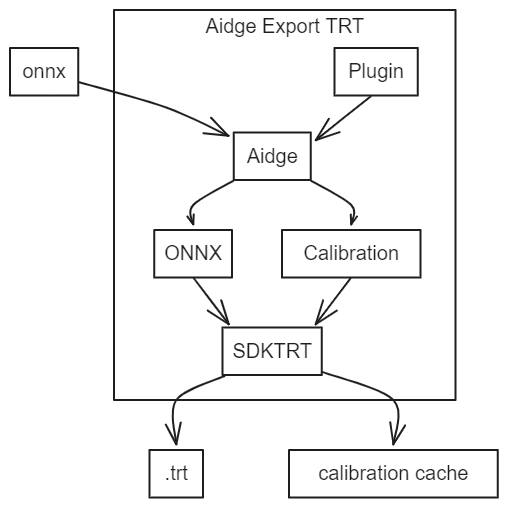
Furthermore, as shown in this image but not demonstrated in this tutorial, Aidge allows the user to:
Add custom operators via the plugin interface
Facilitate the transformation of user data into calibration data
0. Requirements for this tutorial#
To complete this tutorial, we hightly recommend following these requirements:
To have completed the Aidge 101 tutorial
To have installed the
aidge_export_tensorrtmodule
In order to compile the export on your machine, please be sure to have one of these two conditions:
To have installed Docker (the export compilation chain is able to use docker)
To have installed the correct packages to support TensorRT 8.6
1. Exporting the model#
In this tutorial, we will export MobileNetV2, a lightweight convolutional neural network.
[1]:
!wget -c https://github.com/onnx/models/raw/main/validated/vision/classification/mobilenet/model/mobilenetv2-7.onnx
--2025-06-06 14:59:10--  https://github.com/onnx/models/raw/main/validated/vision/classification/mobilenet/model/mobilenetv2-7.onnx
Resolving github.com (github.com)... 140.82.112.4
Connecting to github.com (github.com)|140.82.112.4|:443... connected.
HTTP request sent, awaiting response... 302 Found
Location: https://media.githubusercontent.com/media/onnx/models/main/validated/vision/classification/mobilenet/model/mobilenetv2-7.onnx [following]
--2025-06-06 14:59:10--  https://media.githubusercontent.com/media/onnx/models/main/validated/vision/classification/mobilenet/model/mobilenetv2-7.onnx
Resolving media.githubusercontent.com (media.githubusercontent.com)... 185.199.109.133, 185.199.110.133, 185.199.108.133, ...
Connecting to media.githubusercontent.com (media.githubusercontent.com)|185.199.109.133|:443... connected.
HTTP request sent, awaiting response... 200 OK
Length: 14246826 (14M) [application/octet-stream]
Saving to: ‘mobilenetv2-7.onnx’

mobilenetv2-7.onnx  100%[===================>]  13.59M  --.-KB/s    in 0.03s

2025-06-06 14:59:11 (432 MB/s) - ‘mobilenetv2-7.onnx’ saved [14246826/14246826]
For visualizing the model structure, we recommend using Netron. If you haven’t installed Netron yet, you can do so by executing the following command:
[2]:
# !pip install netron
Once installed, you can launch Netron to visualize the model:
[3]:
# import netron
# netron.start('mobilenetv2-7.onnx', 8080)
Then let’s export the model using the aidge_export_tensorrt module.
[4]:
# First, be sure that any previous exports are removed
!rm -rf export_trt
[5]:
import aidge_export_tensorrt

# Generate export for your model
# This function takes as argument the name of the export folder
# and the onnx file or the graphview of your model
aidge_export_tensorrt.export("export_trt", "mobilenetv2-7.onnx")
---------------------------------------------------------------------------
ModuleNotFoundError                       Traceback (most recent call last)
Cell In[5], line 1
----> 1 import aidge_export_tensorrt
      3 # Generate export for your model
      4 # This function takes as argument the name of the export folder
      5 # and the onnx file or the graphview of your model
      6 aidge_export_tensorrt.export("export_trt", "mobilenetv2-7.onnx")

ModuleNotFoundError: No module named 'aidge_export_tensorrt'
The export povides a Makefile with several options to use the export on your machine. You can generate a C++ export or a Python export.
You also have the possibility to compile the export or/and the Python library by using Docker if your host machine doesn’t have the correct packages. In this tutorial, we generate the Python library of the export and use it a Python script.
All of these options are resumed in the helper of the Makefile (run make help in the export folder for more details).
[6]:
# Compile the export Python library by using docker
# and the Makefile provided in the export
!cd export_trt/ && make build_lib_python_docker
/usr/bin/sh: 1: cd: can't cd to export_trt/
2. Modifying the test script for quantization#
Next, you have to modify test.py by adding nb_bits=8 in the graph constructor and call model.calibrate().
calibrate() can accept three arguments:
calibration_folder_path: to specify the path to your calibration folder
cache_file_path: to use your pre-built calibration cache
batch_size: to specify the batch size for calibration data
[7]:
%%writefile export_trt/test.py
"""Example test file for the TensorRT Python API."""

import build.lib.aidge_trt as aidge_trt
import numpy as np

if __name__ == '__main__':
    # Load the model
    model = aidge_trt.Graph("model.onnx", nb_bits=8)

    # Calibrate the model
    model.calibrate()

    # Initialize the model
    model.initialize()

    # Profile the model with 10 iterations
    model.profile(10)

    # Example of running inference
    # img: numpy.array = np.load("PATH TO NPY file")
    # output: numpy.array = model.run_sync([img])
Writing export_trt/test.py
---------------------------------------------------------------------------
FileNotFoundError                         Traceback (most recent call last)
Cell In[7], line 1
----> 1 get_ipython().run_cell_magic('writefile', 'export_trt/test.py', '"""Example test file for the TensorRT Python API."""\n\nimport build.lib.aidge_trt as aidge_trt\nimport numpy as np\n\nif __name__ == \'__main__\':\n    # Load the model\n    model = aidge_trt.Graph("model.onnx", nb_bits=8)\n\n    # Calibrate the model\n    model.calibrate()\n\n    # Initialize the model\n    model.initialize()\n\n    # Profile the model with 10 iterations\n    model.profile(10)\n\n    # Example of running inference\n    # img: numpy.array = np.load("PATH TO NPY file")\n    # output: numpy.array = model.run_sync([img])\n')

File ~/checkouts/readthedocs.org/user_builds/eclipse-aidge/envs/stable/lib/python3.10/site-packages/IPython/core/interactiveshell.py:2543, in InteractiveShell.run_cell_magic(self, magic_name, line, cell)
   2541 with self.builtin_trap:
   2542     args = (magic_arg_s, cell)
-> 2543     result = fn(*args, **kwargs)
   2545 # The code below prevents the output from being displayed
   2546 # when using magics with decorator @output_can_be_silenced
   2547 # when the last Python token in the expression is a ';'.
   2548 if getattr(fn, magic.MAGIC_OUTPUT_CAN_BE_SILENCED, False):

File ~/checkouts/readthedocs.org/user_builds/eclipse-aidge/envs/stable/lib/python3.10/site-packages/IPython/core/magics/osm.py:854, in OSMagics.writefile(self, line, cell)
    851     print("Writing %s" % filename)
    853 mode = 'a' if args.append else 'w'
--> 854 with io.open(filename, mode, encoding='utf-8') as f:
    855     f.write(cell)

FileNotFoundError: [Errno 2] No such file or directory: 'export_trt/test.py'
3. Preparing the calibration dataset#
To ensure accurate calibration, it’s essential to select representative samples. In this example, we will use a 224x224 RGB image from the ImageNet dataset.
However, for practical applications, TensorRT suggests that “The amount of input data required is application-dependent, but experiments indicate that approximately 500 images are adequate for calibrating ImageNet classification networks”.
[8]:
# Create calibration folder
!cd export_trt/ && mkdir calibration_folder
/usr/bin/sh: 1: cd: can't cd to export_trt/
[9]:
%matplotlib inline
import matplotlib.pyplot as plt
import matplotlib.image as mpimg

demo_img_path = './data/0.jpg'

img = mpimg.imread(demo_img_path)
imgplot = plt.imshow(img)
plt.show()
---------------------------------------------------------------------------
FileNotFoundError                         Traceback (most recent call last)
Cell In[9], line 7
      3 import matplotlib.image as mpimg
      5 demo_img_path = './data/0.jpg'
----> 7 img = mpimg.imread(demo_img_path)
      8 imgplot = plt.imshow(img)
      9 plt.show()

File ~/checkouts/readthedocs.org/user_builds/eclipse-aidge/envs/stable/lib/python3.10/site-packages/matplotlib/image.py:1520, in imread(fname, format)
   1513 if isinstance(fname, str) and len(parse.urlparse(fname).scheme) > 1:
   1514     # Pillow doesn't handle URLs directly.
   1515     raise ValueError(
   1516         "Please open the URL for reading and pass the "
   1517         "result to Pillow, e.g. with "
   1518         "``np.array(PIL.Image.open(urllib.request.urlopen(url)))``."
   1519         )
-> 1520 with img_open(fname) as image:
   1521     return (_pil_png_to_float_array(image)
   1522             if isinstance(image, PIL.PngImagePlugin.PngImageFile) else
   1523             pil_to_array(image))

File ~/checkouts/readthedocs.org/user_builds/eclipse-aidge/envs/stable/lib/python3.10/site-packages/PIL/Image.py:3505, in open(fp, mode, formats)
   3502     filename = os.fspath(fp)
   3504 if filename:
-> 3505     fp = builtins.open(filename, "rb")
   3506     exclusive_fp = True
   3507 else:

FileNotFoundError: [Errno 2] No such file or directory: './data/0.jpg'
This image has been preprocessed and stored in /data/ as 0.batch file. Information about the image’s shape is stored in the .info file.
[10]:
import shutil

shutil.copy("data/.info", "export_trt/calibration_folder/.info")
shutil.copy("data/0.batch", "export_trt/calibration_folder/0.batch")
---------------------------------------------------------------------------
FileNotFoundError                         Traceback (most recent call last)
Cell In[10], line 3
      1 import shutil
----> 3 shutil.copy("data/.info", "export_trt/calibration_folder/.info")
      4 shutil.copy("data/0.batch", "export_trt/calibration_folder/0.batch")

File ~/.asdf/installs/python/3.10.17/lib/python3.10/shutil.py:417, in copy(src, dst, follow_symlinks)
    415 if os.path.isdir(dst):
    416     dst = os.path.join(dst, os.path.basename(src))
--> 417 copyfile(src, dst, follow_symlinks=follow_symlinks)
    418 copymode(src, dst, follow_symlinks=follow_symlinks)
    419 return dst

File ~/.asdf/installs/python/3.10.17/lib/python3.10/shutil.py:254, in copyfile(src, dst, follow_symlinks)
    252     os.symlink(os.readlink(src), dst)
    253 else:
--> 254     with open(src, 'rb') as fsrc:
    255         try:
    256             with open(dst, 'wb') as fdst:
    257                 # macOS

FileNotFoundError: [Errno 2] No such file or directory: 'data/.info'
4. Generating the quantized model#
Finally, run the test script to quantize the model with the export python library and profile it.
[11]:
!cd export_trt/ && make test_lib_python_docker
/usr/bin/sh: 1: cd: can't cd to export_trt/
Following these steps have enabled you to conduct 8-bit quantization on your model. Upon completing the calibration, the calibration data can be reused if a calibration_cache exists, saving computational resources.
[12]:
!tail -n +0 export_trt/calibration_cache
tail: cannot open 'export_trt/calibration_cache' for reading: No such file or directory
After quantization, feel free to save the generated TensorRT engine using model.save("name_of_your_model"). The method will save the engine into a .trt file.
To load the engine for further applications, use model.load("name_of_your_model.trt") after instancing a model.